Scanners and cameras that work with Spool
Spool controls these itself — scanning, live view, the shutter — without the maker's software. Every other scanner and camera works too, the ordinary way: scan or shoot to files with its own software and import them, or point it at a folder Spool watches.
Scanners
| Device | Status | What works |
|---|---|---|
| Epson Perfection V700 Photo | Works | Direct control: 35 mm and 120 holders, 48-bit colour, every frame on the glass found by itself |
| Epson Perfection V750 Pro | Not yet confirmed | The same scanner as the V700 inside; should work the same |
| Other Epson Perfection film scanners (V500, V550, V600, V800, V850, 4990) | Not yet confirmed | They speak the same documented Epson language, but each model answers a little differently — send a report |
Film scanners (31)
- Canon CanoScan 4400F
- Canon CanoScan 5600F
- Canon CanoScan 8400F
- Canon CanoScan 8600F
- Canon CanoScan 8800F
- Canon CanoScan 9000F
- Canon CanoScan 9000F Mark II
- Epson Perfection 1650
- Epson Perfection 1650 PHOTO
- Epson Perfection 1660 PHOTO
- Epson Perfection 2400 PHOTO
- Epson Perfection 2450 PHOTO
- Epson Perfection 3200 PHOTO
- Epson Perfection 4870 PHOTO
- Epson Perfection 4990 PHOTO
- Epson Perfection V700 Photo
- Epson Perfection V750 Photo
- Epson Perfection V800 Photo
- Epson Perfection V850 Pro
- Nikon Coolscan V ED
- Nikon Super Coolscan LS-5000 ED
- Plustek OpticFilm 7200
- Plustek OpticFilm 7200 (v2)
- Plustek OpticFilm 7200i
- Plustek OpticFilm 7300
- Plustek OpticFilm 7400
- Plustek OpticFilm 7500i
- Plustek OpticFilm 7600i
- Plustek OpticFilm 8100
- Plustek OpticFilm 8200i
- Plustek OpticFilm 8200i SE
Cameras (tethering)
| Device | Status | What works |
|---|---|---|
| Canon EOS 6D | Works | Live view, focus, exposure and shutter from Spool; frames arrive converted |
| Other Canon EOS bodies with live view over USB | Not yet confirmed | The same Canon commands as the 6D; live view and capture should work — send a report |
| Nikon bodies with live view over USB | Experimental | Live view and capture are written but not yet confirmed on a body |
| Any camera, through its maker's tethering software | Works | Point Canon EOS Utility, Nikon NX Tether, Sony Imaging Edge or Fujifilm X Acquire at a folder; Spool converts each frame as it lands |
Cameras with tethering (351)
Canon · 123
- Digital IXUS 180 · live view
- Digital IXUS 400 · live view
- Digital IXUS 430 · live view
- Digital IXUS 500 · live view
- Digital IXUS II · live view
- Digital PowerShot SX730HS · live view
- EOS 1000D · live view
- EOS 100D · live view
- EOS 1100D · live view
- EOS 1200D · live view
- EOS 1300D · live view
- EOS 1D C · live view
- EOS 1D Mark III
- EOS 1D Mark IV · live view
- EOS 1D X · live view
- EOS 1D X MarkII · live view
- EOS 1D X MarkIII · live view
- EOS 2000D · live view
- EOS 200D · live view
- EOS 250D · live view
- EOS 30D
- EOS 4000D · live view
- EOS 400D
- EOS 40D · live view
- EOS 450D · live view
- EOS 500D · live view
- EOS 50D · live view
- EOS 550D · live view
- EOS 5D Mark II · live view
- EOS 5D Mark III · live view
- EOS 5D Mark IV · live view
- EOS 5DS · live view
- EOS 5DS R · live view
- EOS 5Rm2 · live view
- EOS 600D · live view
- EOS 60D · live view
- EOS 650D · live view
- EOS 6D · live view
- EOS 6d Mark II · live view
- EOS 700D · live view
- EOS 70D · live view
- EOS 750D · live view
- EOS 760D · live view
- EOS 77D · live view
- EOS 7D · live view
- EOS 7D MarkII · live view
- EOS 80D · live view
- EOS 90D · live view
- EOS M · live view
- EOS M10 · live view
- EOS M100 · live view
- EOS M2 · live view
- EOS M200 · live view
- EOS M3 · live view
- EOS M5 · live view
- EOS M50 · live view
- EOS M50m2 · live view
- EOS M6 · live view
- EOS M6 Mark II · live view
- EOS R · live view
- EOS R1 · live view
- EOS R10 · live view
- EOS R100 · live view
- EOS R3 · live view
- EOS R5 · live view
- EOS R5 C · live view
- EOS R50 · live view
- EOS R50 V · live view
- EOS R6 · live view
- EOS R6 Mark III · live view
- EOS R6m2 · live view
- EOS R7 · live view
- EOS R8 · live view
- EOS Rebel T7i · live view
- EOS Rebel T8i · live view
- EOS RP · live view
- PowerShot A300 · live view
- PowerShot A310 · live view
- PowerShot A400 · live view
- PowerShot A460 · live view
- PowerShot A510 · live view
- PowerShot A520 · live view
- PowerShot A60 · live view
- PowerShot A620 · live view
- PowerShot A640 · live view
- PowerShot A650IS · live view
- PowerShot A70 · live view
- PowerShot A75 · live view
- PowerShot A80 · live view
- PowerShot A85 · live view
- PowerShot A95 · live view
- PowerShot G10 · live view
- PowerShot G3 · live view
- PowerShot G3 X · live view
- PowerShot G5 · live view
- PowerShot G5X · live view
- Powershot G6 · live view
- PowerShot G7 · live view
- PowerShot G7 X · live view
- PowerShot G7 X Mark II · live view
- PowerShot G7 X Mark III · live view
- PowerShot G9 · live view
- PowerShot G9 X Mark II · live view
- PowerShot S1 IS · live view
- PowerShot S2 IS · live view
- PowerShot S230 · live view
- PowerShot S3 IS · live view
- PowerShot S5 IS · live view
- PowerShot S50 · live view
- Powershot S60 · live view
- Powershot S70 · live view
- PowerShot S80 · live view
- PowerShot SD110 · live view
- PowerShot SD500 · live view
- Powershot SX100 IS · live view
- PowerShot SX110 IS · live view
- PowerShot SX530 HS · live view
- PowerShot SX540 HS · live view
- PowerShot SX600 HS · live view
- PowerShot SX70 HS · live view
- PowerShot SX740 HS · live view
- SX 620HS · live view
- SX 720HS · live view
Fuji · 18
- Fujifilm GFX 100S · live view
- Fujifilm GFX 100S (2nd) · live view
- Fujifilm GFX100 · live view
- Fujifilm GFX100 II · live view
- Fujifilm X-E3 · live view
- Fujifilm X-H1 · live view
- Fujifilm X-H2 · live view
- Fujifilm X-M5 · live view
- Fujifilm X-Pro2 · live view
- Fujifilm X-Pro3 · live view
- Fujifilm X-T1 · live view
- Fujifilm X-T2 · live view
- Fujifilm X-T3 · live view
- Fujifilm X-T4 · live view
- Fujifilm X-T5 · live view
- GFX 50 R · live view
- GFX 50 S · live view
- S5 Pro
Leica · 5
- M11 Monochrom
- M9
- Q3 · live view
- SL (Typ 601) · live view
- SL3 · live view
Nikon · 147
- Coolpix 2200
- Coolpix 2200v1.1
- Coolpix 3700
- Coolpix 4100
- Coolpix 4600a
- Coolpix 5000
- Coolpix 5400
- Coolpix 5600
- Coolpix 5700
- Coolpix 5900
- Coolpix 7600
- Coolpix 7900
- Coolpix 8800
- Coolpix 9400
- Coolpix A
- Coolpix A900
- Coolpix AW100
- Coolpix AW110
- Coolpix AW130
- Coolpix B500
- Coolpix B700 · live view
- Coolpix L100
- Coolpix L110
- Coolpix L12
- Coolpix L120
- Coolpix L16
- Coolpix L19
- Coolpix L20
- Coolpix L23
- Coolpix L27
- Coolpix L340
- Coolpix L810
- Coolpix L820
- Coolpix L840
- Coolpix P1
- Coolpix P100
- Coolpix P1000 · live view
- Coolpix P1100 · live view
- Coolpix P2
- Coolpix P330
- Coolpix P4
- Coolpix P500
- Coolpix P5000
- Coolpix P60
- Coolpix P6000
- Coolpix P7000
- Coolpix P7100
- Coolpix P80
- Coolpix P80 v1.1
- Coolpix P900
- Coolpix S01
- Coolpix S02
- Coolpix S200
- Coolpix S220
- Coolpix S225
- Coolpix S2500
- Coolpix S2600
- Coolpix S2700
- Coolpix S2900
- Coolpix S3000
- Coolpix S3100
- Coolpix S3200
- Coolpix S3300
- Coolpix S3500
- Coolpix S3600
- Coolpix S3700
- Coolpix S4300
- Coolpix S6300
- Coolpix S6800
- Coolpix S9100
- Coolpix S9500
- Coolpix S9700 · live view
- D2Hs
- D2X SLR
- D3
- D50
- DSC D200
- DSC D2Xs
- DSC D300
- DSC D3000
- DSC D300s · live view
- DSC D3100
- DSC D3200 · live view
- DSC D3300 · live view
- DSC D3400 · live view
- DSC D3500 · live view
- DSC D3s · live view
- DSC D3x · live view
- DSC D4 · live view
- DSC D40
- DSC D40x
- DSC D4s · live view
- DSC D5 · live view
- DSC D500 · live view
- DSC D5000 · live view
- DSC D5100 · live view
- DSC D5200 · live view
- DSC D5300 · live view
- DSC D5500 · live view
- DSC D5600 · live view
- DSC D6 · live view
- DSC D60
- DSC D600 · live view
- DSC D610 · live view
- DSC D70
- DSC D700 · live view
- DSC D7000 · live view
- DSC D70s
- DSC D7100 · live view
- DSC D7200 · live view
- DSC D750 · live view
- DSC D7500 · live view
- DSC D780 · live view
- DSC D80
- DSC D800 · live view
- DSC D800E · live view
- DSC D810 · live view
- DSC D810A · live view
- DSC D850 · live view
- DSC D90 · live view
- DSC Df · live view
- J1
- J2
- J3
- J4
- J5
- KeyMission 170
- KeyMission 360
- P950 · live view
- S1
- S2
- V1
- V2
- V3
- Z30 · live view
- Z5 · live view
- Z50 · live view
- Z50_2 · live view
- Z6 · live view
- Z6 III · live view
- Z6_2 · live view
- Z7 · live view
- Z7_2 · live view
- Z8 · live view
- Z9 · live view
- Zf · live view
- Zfc · live view
Olympus · 4
- E-M1 MII · live view
- E-M5 Mark II · live view
- OM-1 · live view
- OM-1MarkII · live view
Panasonic · 2
- DC-GH5 · live view
- DMC-GX8 · live view
Parrot · 1
- Sequoia
Sigma · 2
- fp · live view
- fp L · live view
Sony · 49
- A6700 · live view
- Alpha-A5000
- Alpha-A5100 · live view
- Alpha-A6000
- Alpha-A6100 · live view
- Alpha-A6300 · live view
- Alpha-A6500 · live view
- Alpha-A6600 · live view
- Alpha-A68 · live view
- Alpha-A7
- Alpha-A7 III · live view
- Alpha-A7 IV · live view
- Alpha-A77 M2 · live view
- Alpha-A7III · live view
- Alpha-A7r
- Alpha-A7r II · live view
- Alpha-A7r III · live view
- Alpha-A7S · live view
- Alpha-A7S II · live view
- Alpha-A9 · live view
- Alpha-A99 M2 · live view
- Alpha-RX10M4 · live view
- Alpha-RX1R II · live view
- DSC RX0 II · live view
- DSC-A7r IV · live view
- DSC-A7S III · live view
- DSC-A900
- DSC-RX0 · live view
- DSC-RX100M4 · live view
- DSC-RX100M5A · live view
- DSC-RX100M6 · live view
- DSC-RX100M7 · live view
- DSC-RX100V
- DSC-RX10M3 · live view
- ILCE-1 · live view
- ILCE-1M2 · live view
- ILCE-6400 · live view
- ILCE-7C · live view
- ILCE-7M2 · live view
- ILCE-7M5 · live view
- ILCE-7RM3A · live view
- ILCE-7RM4A · live view
- ILCE-7RM5 · live view
- ILCE-9M3 · live view
- ILME-FX3 · live view
- ILX-LR1 · live view
- SLT-A58
- ZV-1 · live view
- ZV-E10 · live view
Help add your scanner or camera
Spool adds a device only when someone who owns it sends its report — there is no other way to learn how a model talks. It takes two minutes, and it is how the list above grows: one report is often enough to add a camera.
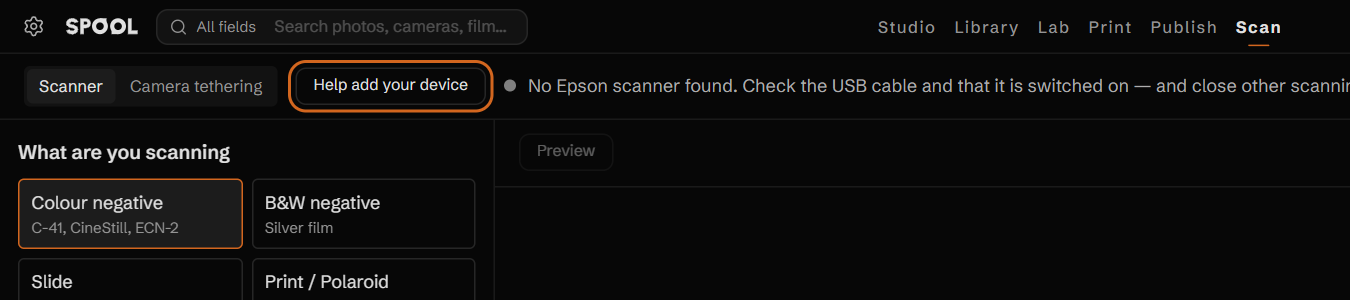
Open Scan in Spool with the device plugged in and switched on, and press Help add your device. If it is a film scanner or a tethering camera that is not on the list yet, Spool also offers this by itself, once.
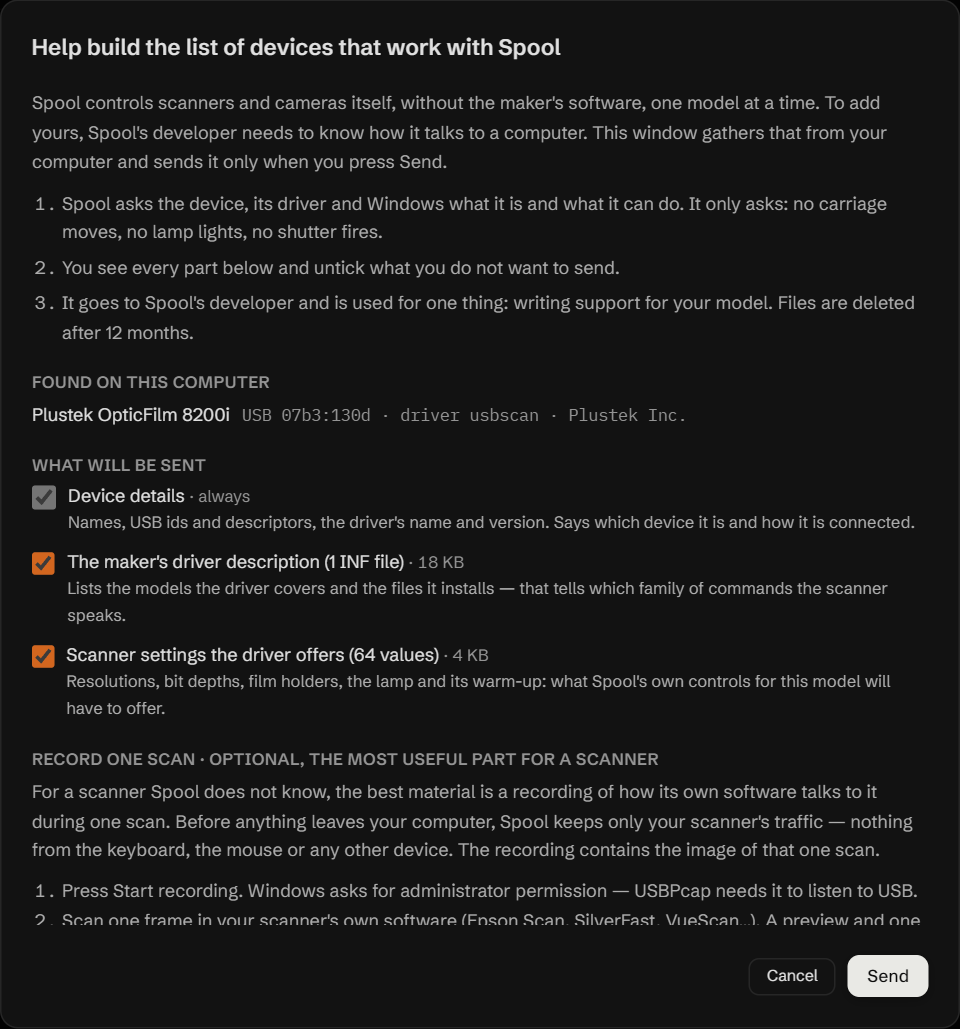
Spool asks the device, its driver and Windows what it is and what it can do. You see every part, with what it is for, and untick anything you do not want to send.
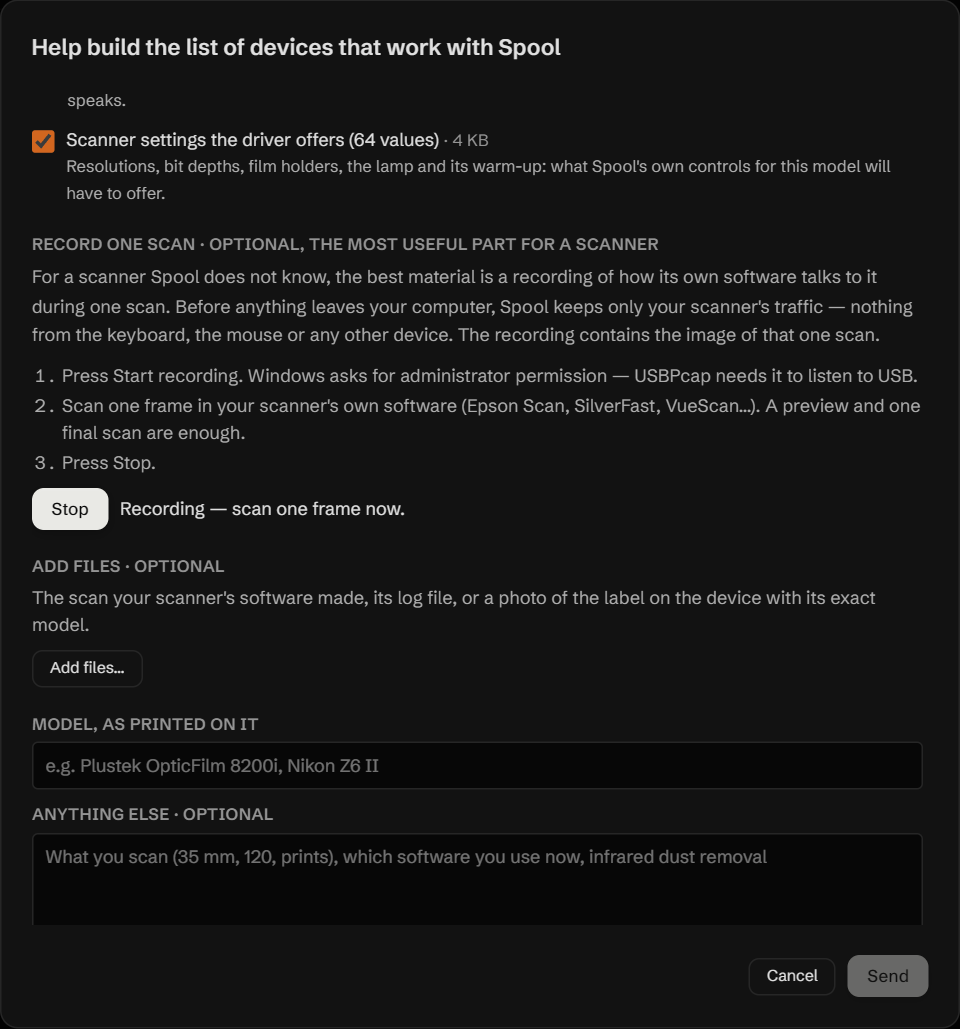
On Windows, record the device at work in its own software: one scan for a scanner; live view, a focus click, a change of shutter speed or ISO and one shot for a camera (EOS Utility, NX Tether, Imaging Edge, X Acquire). Press Install USBPcap — Spool carries this free USB recorder, installs it after Windows asks for permission, and records once the computer has restarted. Uninstall USBPcap removes it afterwards. Spool keeps only that device's traffic — nothing from the keyboard, the mouse or other devices. Several devices plugged in at once go into one report. On a Mac this step is left out — macOS allows recording USB only with its system protection switched off — and the rest of the report is sent as usual; one recording made on Windows serves both systems.
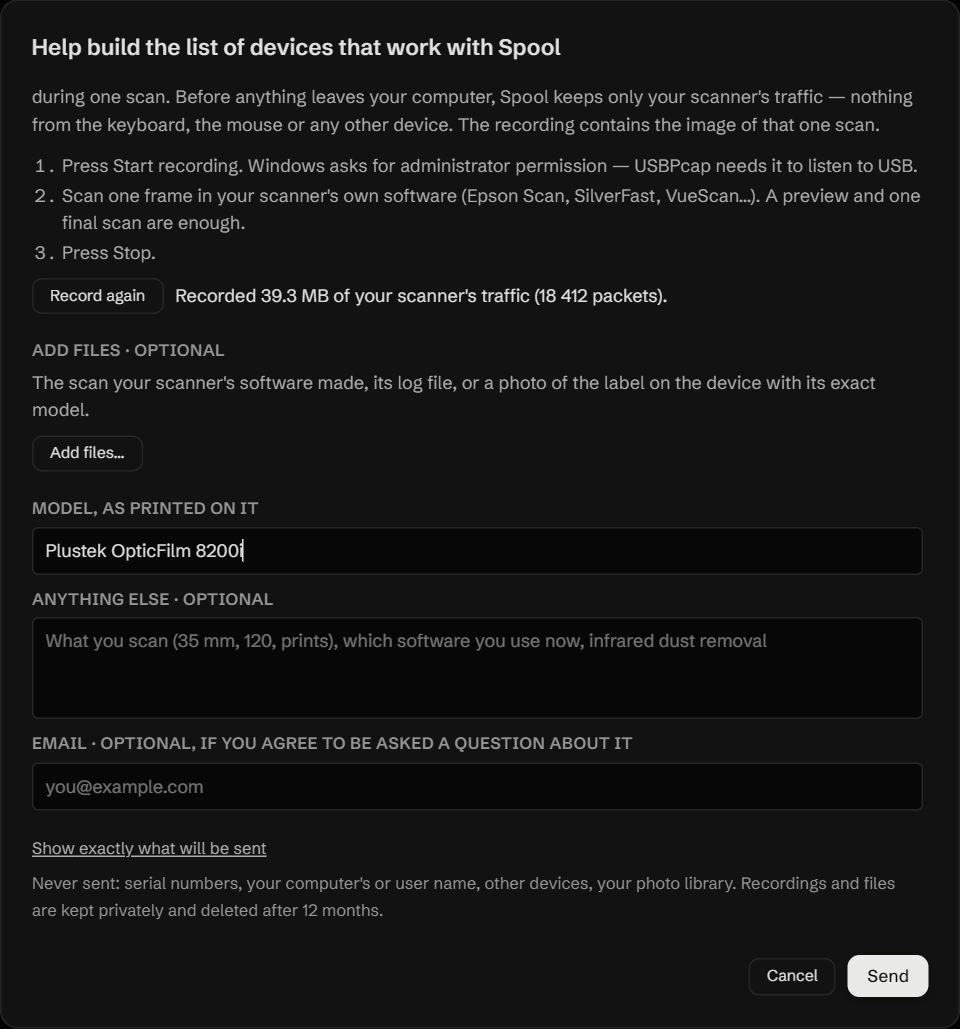
Type the model and press Send. It is used only to add support for that model. No serial numbers, no computer or user name, no photo library; files are deleted after 12 months.
Download SpoolThe report is sent from the app — the free version is enough.
Which devices can be added
Spool only adds devices that are worth driving for film: 31 film scanners — models with a light in the lid or a film holder — and 351 cameras that can be controlled from a computer (242 of them with live view), the same models the main open-source tethering library supports. Office scanners, printers and phones are left out. Yours is on these lists? Send its report.
How a device moves up the list
A model marked Not yet confirmed moves to Works once someone with it sends a report and a scan comes out right. The more reports for one model, the sooner it is added — a camera often needs only its report; a scanner nobody has documented needs the recording of one scan.