Tab by tab, in the order the app shows them. Studio is the module joining it now.
Work
Where you start: what you did last, your film and what it costs.
At a glance 3
Recent rolls and activity, film prices over time, news and release notes.
Report feedback with a screenshot, from inside the app.
One licence for four computers, Windows and macOS in any mix; a free trial of every feature with 36 conversions.
Library
Every scan in rolls, folders and numbered frames, with what you shot it on.
Organising 4
Rolls with covers, folders, numbered frames; drag frames and rolls to move them.
Browse by roll, date, camera, film or place; justified, grid, contact sheet and compare views.
Camera, lens, film, format, place, exposure, rating, colour label and tags for one frame or many at once.
Map of where photos were taken.
Importing 3
Import files or a whole folder, keep them in place or copy them into a folder of your choice.
Hot folders: scans saved by your scanner software arrive in a roll by themselves.
Duplicates found before they are imported twice.
Between computers 3
Sync between Spools on the same Wi-Fi and licence, Windows and macOS mixed; newer edits always win.
See what sync will change before it does.
Send photos to a nearby Spool.
Lab
Lab turns negatives into photographs, one or hundreds at a time, and edits them with the same controls. Every change is non-destructive.
The conversion 6
Colour and black-and-white negatives, slides, instant prints and digital photographs, each recognised on import and treated as what it is.
Film colour measured on the clear border of the frame, or worked out from the picture when a scan has no border.
Camera raws (CR2, CR3, NEF, ARW, RAF, DNG…) and scanner files (TIFF, JPEG, PNG), each read in its own colour space.
A box around the picture leaves the holder and sprocket holes out of the measurement; crop to the box or keep the whole scan.
Straighten, turn and set the box proportions while converting.
Dust, hairs and scratches kept out of the white point, so they never set the colour.
Many frames at once 5
Convert a whole roll, a folder or hundreds of camera scans with one setup and one click.
One film colour measured once and used for the whole batch; a frame adjusted on its own keeps its own box.
Conversions run in the background: the batch editor opens while frames are still converting.
The right-click menu shows how many frames will be converted before anything starts.
Copy a conversion from one frame to others.
Film and looks 3
Colour film profiles measured from colour charts shot on each stock; see the frame on every film before choosing.
H&D curve of each film for tones as they were on the negative.
Presets in one place, your own looks, and Lightroom presets imported.
Light and tone 4
Exposure in real stops, contrast, highlights, midtones, shadows, whites and blacks.
Tone protection for highlights and shadows, always starting at zero after a conversion.
An editable histogram: drag where shadows end and highlights begin; per channel.
Tone curve, and a clipping warning drawn on the picture where it happens.
Colour 6
White balance: pick a grey point, or Auto, Warm, Cool; colour that recognises skin and daylight.
Cyan–Red, Magenta–Green, Yellow–Blue and Lighter–Darker for all tones, or shadows, midtones and highlights apart.
Vibrance and saturation.
Color Grading with three wheels and luminance for shadows, midtones and highlights.
Color Mixer by colour or by property (hue, saturation, luminance).
Colour scope (vectorscope) to judge skin and casts.
Detail and retouch 3
Sharpening (high pass), clarity, texture, dehaze, grain and vignette.
Dust removal, Newton's rings and scanner streaks, measured on real scans.
Healing brush: paint over dust and hairs and they are filled from the picture around them.
Working 4
Batch edit: every move is added to each frame from its own value, so frames balanced one by one stay balanced.
Before and after: off, split, side by side, or hold B.
Crop with ratios, Enter applies; standard keyboard shortcuts.
Export to JPEG, TIFF and PDF, CMYK for press with a soft proof, and paper simulation.
Print
Darkroom-style printing to your own printer, laid out by picture.
Prints and tests 3
Test strips and proofs from your layout, several tests on one sheet, mixed strips.
Contact sheets that lay themselves out, and proof sheets laid out your way.
Printer and paper settings, your own page size, prints shown as they will come out.
Zines and books 3
Zines up to sixteen pages with a folding guide, printed true to size.
Photo books, photos across two pages, text styled as in a photo book.
Rearrange pages and swap photos by dragging; PDF export.
Publish
Posts and slides for social media, laid out like in a design tool.
Layouts 3
Templates and draggable layouts, several photos on one slide, words wherever you want them.
Every format a platform asks for, copied to other platforms in one click.
Projects kept, synced between computers, opened in Lab from a page.
Scan
Scan from Spool itself, with a flatbed scanner or a camera.
Scanners 2
Epson Perfection V700/V750 driven directly: frames on the glass detected automatically, dust removed during the scan.
Colour negative, black-and-white negative and positive modes, with automatic exposure.
Cameras 2
Camera scanning with tethering: Canon and more cameras, with a live view and the negative shown as a positive.
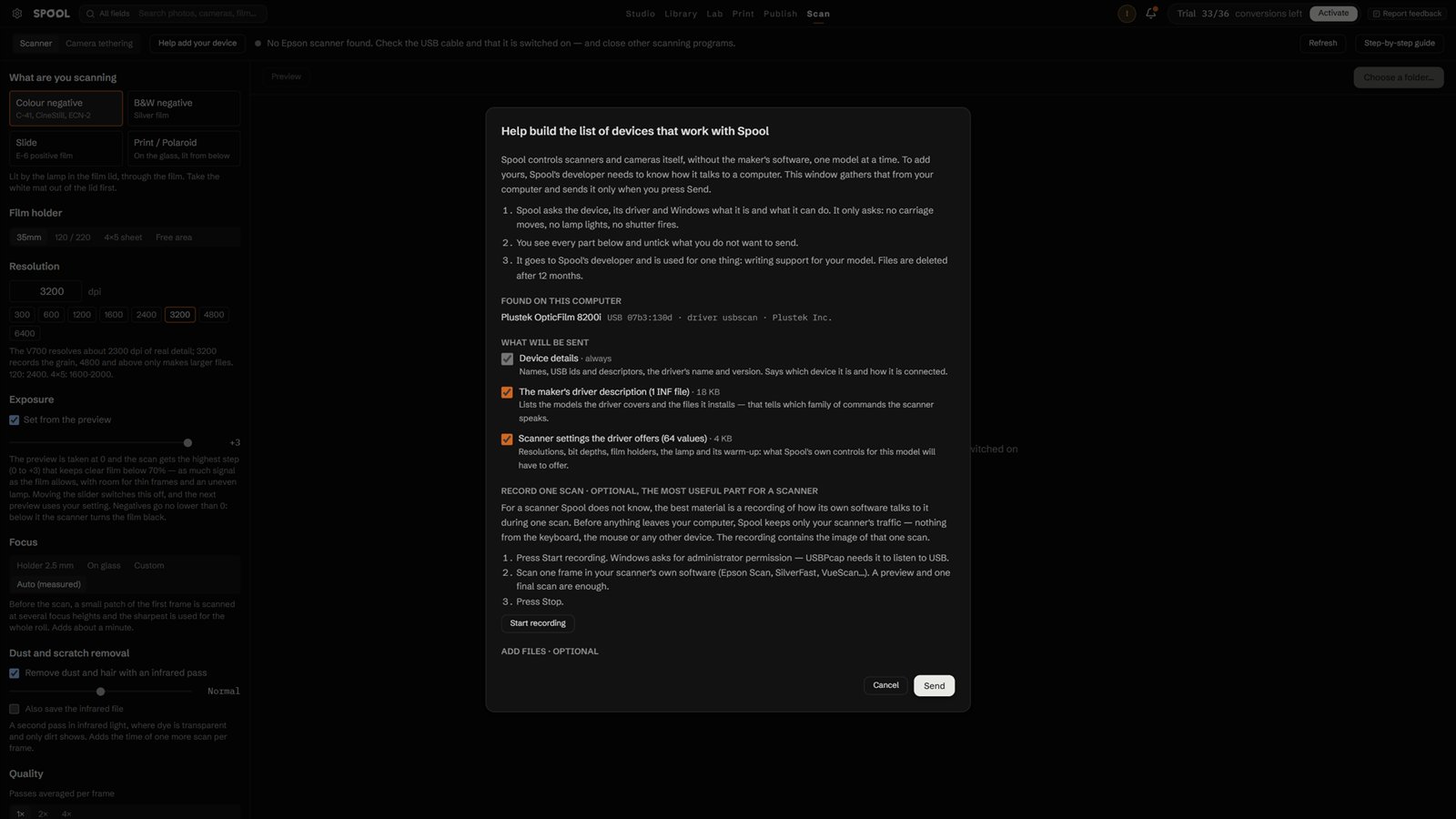
Help add your device: Spool records what a scanner or camera says, so support for it can be written.
Studio
New in 0.9.8 · full version with a licence
A new Studio module joins Spool: your studio, rooms and locations drawn to scale, your own equipment, and the photograph a camera would take — metered from the lights and daylight in the room.
Full Studio with a licence 4
Everything listed here comes with a Spool licence.
Without one, Studio is a preview: one lamp, one camera on one 50 mm lens, one backdrop, one window and the model, in a room that cannot be changed.
The camera's picture shows in the app only: no saving set-ups or shots, no plan PDF or PNG, no searching the equipment.
Multiple exposure with up to two shots; everything else is shown, greyed, with a lock.
Rooms and places 4
Build rooms to scale: walls, ceiling height, doors, windows, a cyc; your own studio, rented spaces and outdoor locations.
Wall, floor and ceiling colour and finish, and how much light each throws back.